The Course
Let's get started with the actual content of the course now. Everything you'll learn is on this single page.
Why pseudo code?
When it's time to sit down and start learning to program your first bit of code, it's very common for people to draw a complete blank. They sit there starring at the screen wondering what to type or how-to represent their ideas as code. It's this last part that we're going to focus on in this short course.
You'll learn to use pseudo code to represent ideas in whatever format you like, using whatever terminology you like. You'll be able to write the idea of a computer program without having to learn a programming language. Essentially, we'll answer the following question: How do you represent real-world ideas and concepts as code?
The answer is split into two components: the problem domain and the implementation domain.
The Problem Domain
Imagine you own a farm. It has four large fields for crops. It has live stock such as cows, sheep, and so on. I bet this is easy for you to picture. Almost everyone knows what a farm looks like or has some idea from television, comics, or books.
Now imagine you have to start tracking the farm's performance. You have the following question: "How profitable is my farm?"
To answer this question, you have to track how many crops you grew, how much milk your cows produced, how many eggs your hens laid, and so on. How do you track whether or not you're producing enough of each thing, and how do you tell if you're making enough money?
This is the problem domain, and it's defined by the literal problem you have to solve. But how do you convert the intellectual understanding of a farm and how it operates to code that a computer can understand?
To achieve this, the problem needs to be broken down into components and their attributes. Let's do that now.
Breakdown
You have a "farm". It has "fields" on it. One of the fields has live stock on it in the form of "cows" and "hens". The "cows" produce "milk" and the hens produce "eggs". Two of the "fields" produce "wheat". One of the "fields" produces "corn".
We're keeping this simple
Obviously a farm is exponentially more complicated than this. We're just keeping it simple as we're learning here.
We have the following components that make up our farm:
- Field
- Cow
- Hen
- Milk
- Eggs
- Wheat
- Corn
These components represent the farm as a whole, but each one has attributes.
The Field has a size in "hectares". It also has a "crop" that it's designed for, unless it's designed for live stock. It can have lots of other attributes too, but that'll do for now.
The Cow and the Hen have attributes like "age", "sex", "breed", "healthy", etc.
The Milk, Eggs, Wheat, and Corn have attibutes such as "quality", "quantity", "type", "weight", "expiry", and more.
What we're doing here is breaking the problem domain up into smaller components and then agreeing upon the attributes those components have that make them what they are. We've reversed engineered the problem (domain) into the things it's made of and defined what they look like.
With pseudo code, we can now begin to write an abstract program, which is just a collection of data, algorithms, and logic which you use to work with the components and attributes you've defined to come to some conclusion.
Your data is, for example, the amount of farms you have, and how many fields each one has, plus the cows and their milk; the hens their eggs, and so on. The algorithms are the operations you want to perform on the data, like "Count the eggs", "Work out how many litres of milk we have", and more. The logic is just how you make decisions based on what the data looks like, what the results are from your alogrithms, and you use this to then decide what you will do next.
That's a complete computer program in an abstract sense, and it defines the problem (domain) we're trying to solve.
The pseudo code
Now you take the breakdown of the problem domain and start writing pseudo code. This is where you begin to formalise the problem domain into something that has a more rigid structure, all without having to adhere to the exact, strict syntax of a programming language. You're permitted creative freedom in this step, but not too much.
Although you're trying to avoid the rigid syntax of a real programming langauge, you still have to introduce some rigidity and structure, otherwise what you wrote above for the problem domain will look identical to what you write for your pseudo code. Let me explain with an example.
Imagine this problem domain:
I have a bottle with 1 litre of water in it. I want to calculate how long it will last me if I drink X millilitres per minute, rounding down to the nearest 60 minutes.
Now if I don't have any structure or formality to my pseudo code, I might write something like this as my "pseudo code":
I have a bottle. It has 1 litre of water in it. I drink X millilitres every Y minutes. It will last ((1/X)*Y)/60 hours, rounded down.
All we've really done here said the same thing again, but with less language around it. And we still can't convert this to code because we have the same problem: how do we represent this as code.
That's why your pseudo code has to have some structure and syntax to it. Let's write the pseudo code again, but with a simple syntax:
That's a bit better as it's a bit more formalised, but that last bit is messy and confusing to read. You'll need a bit more structure again:
Now that's much better. It's still easy to read, has just enough formalisation as to not be hard to learn or use, and the end result is the same. It's also easier to see how you can change the inputs - the numbers like minutes, rate, capacity, etc. - so that you can change the outcome and experiment.
Here's another trick to getting the pseudo code right: can you write out this solution with pen and paper, and also "execute it" on paper too? Here's my attempting at doing so:
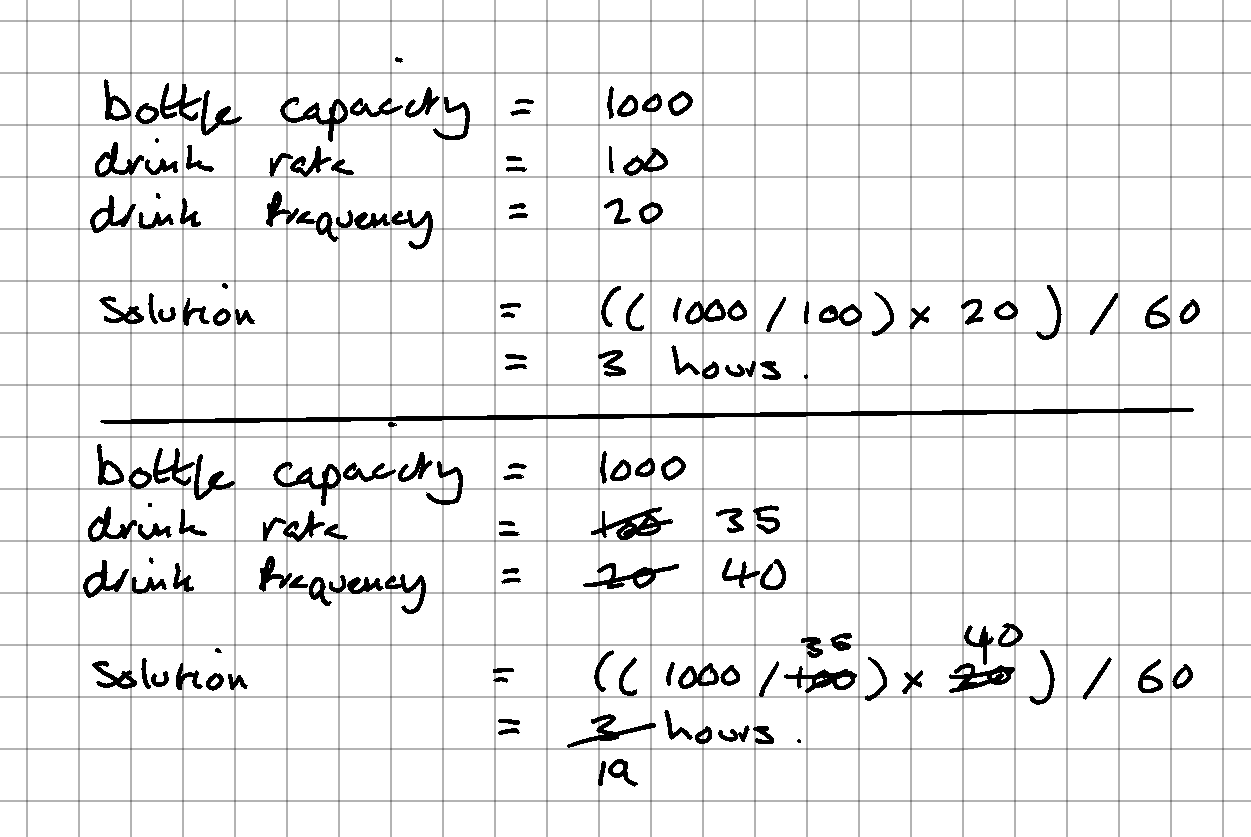
Please excuse my messy hand writing - I grew on computers.
You can clearly see I was able to easily hand write the pseudo "code" and "run" the program. Ideally, you want to be able to do this when converting from a (small) problem domain to pseudo code. If you can't, then consider breaking the problem domain down into smaller chunks. If that's not possible, then it's OK to ship this "hand writing" stage - it's just a nice to have.
The Implementation Domain
Once you understand the breakdown of the problem domain, and after you've written the pseudo code, you then enter the implementation domain.
This is where the real code, not the pseudo code, is written.
An Example Assignment
Let's look at a problem you might face as a first time programmer: the University assignment. This is a bit like a real assignment I helped a student with.
- Write a program in Python that takes input from the user on the command line
- The program should first ask the user how many factories they have
- Second it should ask them how many products each factory produces
- Third, how much each product costs to manufacture
- Fourth, what the retail price is for each product
- And finally, print a report that tells the user how many factories they have in total, the total number of goods produced, the total cost of production, the total revenue generated, the profits made, and which factory is the most profitable
This kind of task is very commonly provided by universities because it requires the student to use variables, both local and global, if statements, and loops. It gets you thinking about the program's flow, logical branching, storing and updating data, and so on. It's a good beginner assignment and perfect for writing pseudo code.
We'll take a crack at solving this little puzzle shortly, but first we'll explore what pseudo code actually is and look at some examples.
The Problem Domain
Breaking this down into the problem domain will help us nail the pseudo code, which in turn will help us nail the real code.
First we have "factories". Next we have "products" and they have a "manufacturing price" attribute. They also have a "retail price". Finally, we have a "report" with a few key attributes:
- "total factories"
- "total goods"
- "total cost of production"
- "total revenue"
- "profits made"
- "most profitable factory"
Clearly the report is the part of this program using the most data. The rest is simple enough, as you'll see.
Now let's write the pseudo code for this problem domain.
Writing the pseudo code
Pseudo code is like explaining to someone how to solve a problem with a program, making it easy for them to understand how everything fits together, all without writing any actual code. This is helpful because the difference between reading pseudo code and reading Golang is massive.
Let's look at a quick example based on our previous problem with the factories:
Just so you know...
We'll just look at the first part of the problem for now.
Here we can see we're using simple language to define the problem and design an algorithm to handle the problem (or at least this small part of it.) It's not to hard to read:
- We're
PRINTing a message to the screen (like printing a message to paper, but to a screen instead) - Then we're
READing a value given to use by the user when they use their keyboard - Now we enter a
WHILEloop that keeps asking the user a question until the answer is valid - Finally we exit the
WHILEloop and continue with the rest of the program
As it stands right now this isn't a computer program, but it is one step closer to one. Using some simple keywords we can define almost any real-world problem we can think of into this kind of pseudo code solution, and using this specific pseudo code we can then go on to write the implementation in a real programming language.
Now let's write the actual solution and solve the above problem domain.
The complete solution
Now let's look at the complete solution for our problem. Remember, this code doesn't have to be perfect. There are many ways to achieve what we're doing below and you could even argue doing any input validation isn't worth it in pseudo code. I believe it helps keep the objective of the code clearer.
This is the entire pseudo code, which we'll break down into parts below:
Heads up...
I recommend you copy/paste the pseudo code solution into Visual Studio Code, or some other editor with lines numbers, so you can more easily follow along with the below.
The breakdown
Firstly, we have lines 1-6. These start with a comment explaining what we're doing. This comment is a bit irrelevant in the grand scheme of things, it's main purpose is to show case how a comment can be used. We define some variables to hold information we'll need throughout the life of our program. We set their initial values so we know that ahead of time.
On line 9 we're using a PRINT function to print a message to the user. Giving the users feedback by printing text to the terminal is a common and easy way of interacting with the user.
On line 10 we READ some data into a new variable called factories_count. Essentially we're saying we want to take some value (some information) from the user and then store it for use later on. This is also a very common task in software development.
Lines 12-16 comprise a WHILE loop. This means we want to continuously repeat a block of code, over and over, until some condition becomes false (as in, not true.) In this case it's, "Whilst factories_count has no value or that value is not a positive number." Until that is true, the WHILE loop will keep going. We cannot work with an invalid value, after all. We're also READING the value into the factories_count variable inside of the loop. We must do this, otherwise the WHILE will become an infinite loop as the value it's checking is never updated.
Line 18 is where we enter the main FOR loop, and again we begin the process of going around and around until we have collected all the valid data from the user. Our application needs this loops because it collects an unknown amount of information from the user. In this case, the FOR loop goes from 1 to factories_count, which we took from the user above.
Now an important part of this FOR loop is the factory_number part. In this loop we're going between 1 and factories_count. We can prevent that factories_count is 10. As the FOR loop loops, factory_number will be 1, then 2, 3, 4, until it equals 10 and then the FOR loop will end and factory_number will cease to exist.
Lines 19-20 are yet another pair of PRINT and READ function calls. This time, we need to know how many products this particular fractory produced.
Lines 22-26 see us inside another WHILE loop. This time, we want to keep checking for valid input about the (positive) number of products this particular factory (factory_number) has produced for us. It's the same style loop as lines 12-16: it'll keep going until the input valid and then drop out of the loop.
This WHILE loop is what you would call an "inner loop", because it resides inside of another loop.
Lines 28-29 are initialising two variables we're going to track for this particular factory. We need to know how much revenue the factory has generated followed by how much of that revenue is profit. We set the values to 0.0 for now because we need a floating point number (a number with a decimbal place in it) and we now we currently have zero revenue and zero profit.
Line 31 is the start of another inner loop, but this one is a FOR loop and it has a large body of code. It's objective is to now loop over the range of product quantities will collected on lines 22-26 in the WHILE loop. Inside of this loop is where we enter the "per product" code now - code we have to execute per product that was entered into the code above us, in the WHILE loop.
Lines 32-33 is how we now take in the manufacturing code of our product, product_number, so we can work out how much revenue and profit we're making. Lines 35-39 now loop until the manufacturing cost entered is value. This should be a very well understood, familiar piece of code at this point: we're looping until the manufacturing_code variable is a valid positive number.
Lines 41-48 the same thing again, but this time for the retail_price variable and input. There should be no surprises at this point.
Line 51 updates the global variable total_products to be a product of itself plus 1, because we've just collected the data on one more additional product.
Line 52 updates the factory_revenue variable, is just outside of the FOR loop we're currently in, on line 28.
Finally for this inner FOR loop, on line 55 we update the factory_profit variable doing a simple calculation: retail_price - manufacturing_cost. This tells us how much profit we made on each product.
On lines 59-60 we've left the inner FOR and are back in our outter most FOR loop. Once we've finished with the inner FOR loop, the factory_revenue and factory_profit variables are populated with data which we now use to update some global variables. We set total_revenue to a new updated value containing all of the revenue we collected for this particular factory. We do the same for the total_profit variable.
Lines 63-66 is us using an IF statement to check if this factory's revenues (factory_revenue) have exceeded the currently recognised highest amongst all the factories we've computed so far.If it has exceeded the highest, then we update the highest_factory_revenue and most_profitable_factory variables to the information we currently have about our factory.
Lines 66-67 end the IF and FOR loop blocks for us.
Finally for our program, lines 70-74 use the PRINT function to output a report based on all the input we received from the user and the calculations we did with it.
Executing
Because pseudo code isn't real code, we cannot execute it. Instead it has to be converted to a real language and that must be executed. We'll look at converting the pseudo code to Python and Go shortly, but here's the Python code being executed and the results:
It's not the most interesting thing to read, but in short I've simply answered the questions provided by the app and got my self a little report at the end.
Now we're going to look at three conversions of the above pseudo code: Python, Golang, and C. These will help you map the final stage of this process, taking your from the Problem Domain and firmly into the Impementation Domain.